




FAQs
What is web development?
Web development is the process of building and maintaining websites and web applications, from the front-end code that controls what people see and click, to the back-end systems handling data, logic, and security behind the scenes. It covers planning, design, coding, testing, deployment, and everything needed to keep a site running afterward, and increasingly includes directing AI tools as part of that process rather than writing every line by hand.
How long does it take to build a website?
A simple landing page can take one to four weeks. A small business site typically runs two to six weeks. A custom web application or SaaS product usually needs eight to twenty weeks or more, depending on scope and how many integrations are involved.
How much does website development cost in 2026?
Anywhere from a few thousand dollars for a small business site to well over $100,000 for a complex custom application, with the details in the cost section above. The honest answer to "how much will mine cost" is always "it depends on what you're actually building," which is frustrating but true.
Do I need to know how to code to build a website now?
No, not strictly. No-code and AI website builders can get a working site live without writing a line of code. You'll hit a ceiling faster than marketing for those tools suggests once your requirements get more specific than what the tool was designed for, so some understanding of the fundamentals still pays off even if you're not writing code day to day.
What's the difference between a website and a web app?
A website mostly displays information. A web app lets people do something, log in, manage data, and complete a transaction. The line between them is blurrier than it used to be, since even a simple business site with a booking form or a live chatbot is edging toward "app" territory.
How do I make my website visible to LLM models like ChatGPT or Perplexity?
Make sure your important content renders without requiring JavaScript to execute, check that your robots.txt file isn't accidentally blocking AI crawlers, add structured data (schema markup) so your claims are easy to parse, and consider adding an llms.txt file. None of this replaces solid traditional SEO. It sits alongside it.
Building a website used to mean hiring a developer, waiting six weeks for a mockup, and hoping the finished thing loaded in under ten seconds. Some of that is still true. Most of it isn’t.
The space of website development has fractured and rebuilt itself. Today, establishing a digital presence means navigating a wildly shifting intersection of AI integration, changing search engine behaviors, and sophisticated full-stack frameworks.
Are you building intuitive layouts for human users, or are you structuring data for the automated answer engines silently scraping your pages? The reality, increasingly, is that you must do both.
This guide unpacks what web development actually looks like right now. From initial strategy and agentic coding to deployment and security protocols, here is exactly what it takes to build, scale, and maintain a platform built for the next iteration of the internet.
What Does it Mean to Develop a Website in 2026?
Ask ten people what “web development” means, and a few years ago most would’ve said “coding.” That’s not wrong, exactly. It’s just incomplete now.
Website development is the whole process of turning an idea into something that works in a browser: figuring out what it needs to do, designing how it looks and flows, writing (or generating and then checking) the code that runs it, and keeping it alive once real people start using it.
Coding is one part of that, and it’s the part that’s changed the most. A developer today spends a good chunk of their day directing an AI tool through a task, reading what it hands back, and deciding what to keep, cut, or rewrite. That’s a genuinely different skill than typing out every line by hand, even if the end result looks the same in a code editor.
Why A Website Still Matters When People Search Through AI
A website is the one piece of the online presence you actually own. It works while you’re asleep, and it’s usually the first thing someone checks before they trust a business enough to buy from. None of that is news.
What is fairly new is who, or what, is actually visiting that website. Cloudflare’s own Radar dashboard, which tracks traffic across a large slice of the global web, showed automated requests crossing the halfway mark against human requests for the first time in mid-2026.
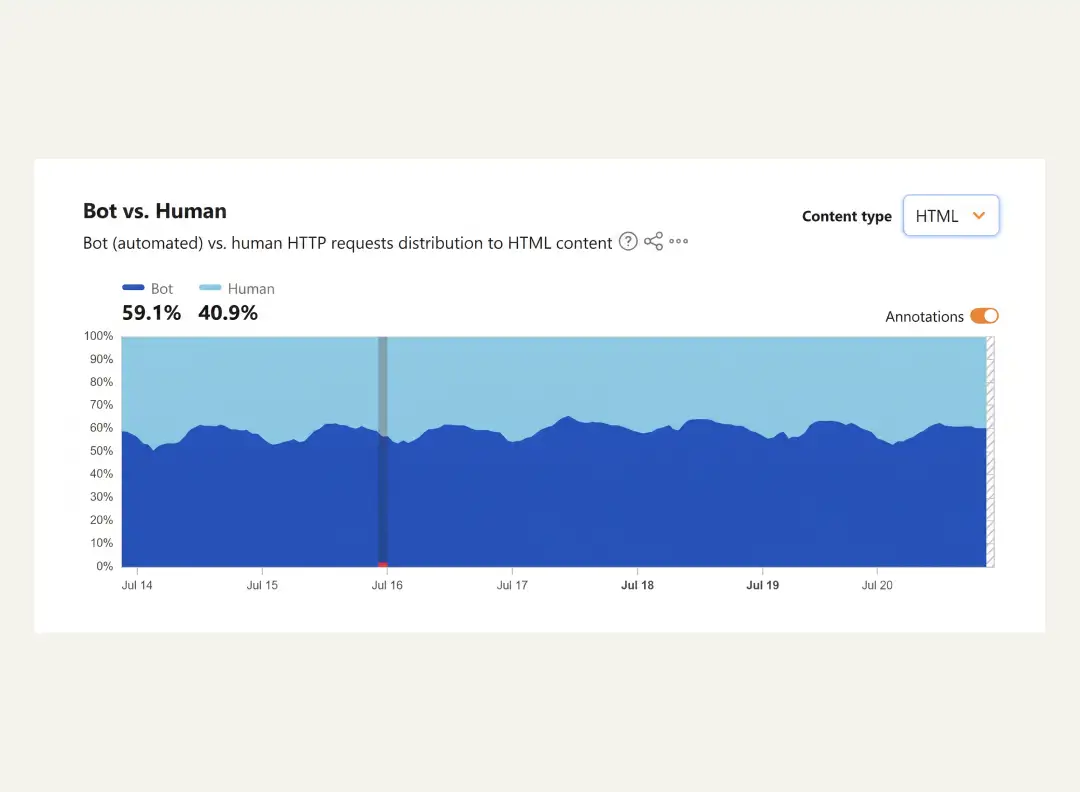
A meaningful share of that jump isn’t spam or scraping bots trying to break in. It’s AI agents and assistants visiting pages on a person’s behalf, reading them, and answering a question without that person ever landing on your site directly.
That changes the job of a website a little. It still has to convince a human being to trust you and take action. But it also has to be legible to something that isn’t human at all, something that needs structure, facts, and claims to be clear enough to lift and repeat accurately.
The short version: A site built only for human eyeballs is already leaving something on the table.
Web Development Basics: The Types Of Web Development
Most explanations of web development stop at three buckets. They’re still the right starting point.
Front-end development
Front-end development is everything a visitor actually sees and clicks: layout, buttons, forms, the way a page reacts when you scroll or tap something. Front-end work has always been closer to design than people expect, and that’s even more true now that AI tools can turn a rough sketch or a one-line prompt into a working component.
Back-end development
Back-end development is everything happening behind that screen. It is the server logic, the database queries, the authentication that checks whether you’re allowed to see this page at all. This is where AI tools are genuinely useful for drafting boilerplate (a login flow, a standard API endpoint) but also where a wrong assumption can quietly create a security hole.
Full-stack development
Full-stack development just means one person or team handles both sides. It used to require years to be competent at both. AI assistants have narrowed that gap somewhat, since a front-end-leaning developer can now lean on a coding agent to draft reasonable back-end scaffolding, and vice versa. However, this gap is narrowed, not closed. A developer still needs to know enough to catch it when the AI gets the architecture wrong.
Then there’s a fourth category that older guides simply didn’t need, because it didn’t exist yet in any mainstream sense.
AI and agentic integration
AI and agentic integration is its own discipline now. Building the chatbot that answers customer questions on your site, the recommendation logic that decides what to show a returning visitor, the in-product AI features that are quickly becoming table stakes.
This isn’t the same skill as “using AI to help you code.” It’s building AI features into the product itself, and it usually touches front-end, back-end, and a bit of applied machine learning knowledge all at once.
| Layer | What it owns | Common tools | Where AI shows up |
| Front-end | UI, layout, interactivity | React, Next.js, Vue, Tailwind | Component generation, design-to-code tools |
| Back-end | Server logic, data, auth | Node.js, Python, databases, APIs | Boilerplate generation, query drafting |
| Full-stack | Both of the above | MERN, Next.js + a database, JAMstack | AI assistants bridging skill gaps between the two |
| AI/agentic layer | In-product AI features | LLM APIs, vector databases, agent frameworks | This layer is the AI feature, not just a tool used to build one |

Bypass the Development Blindspots With Appinventiv Digital
Explore how we combine legacy practices and modern AI to create a website that stands out!
Website Vs. Web App Vs. Progressive Web App
People throw these terms around loosely, and it causes real problems when a client asks for “a website” and actually means something closer to a full application. Here’s the practical difference:
| Website | Web app | Progressive web app (PWA) | |
| What it mainly does | Displays information | Lets people do things (log in, manage data, complete transactions) | A web app that behaves like a native mobile app |
| Interactivity | Low to moderate | High | High |
| Typical example | A restaurant’s homepage | Gmail, a project management tool | A shopping site you can add to your home screen and browse offline |
| Build complexity | Lower | Higher | Higher, plus extra work for offline support and installability |
None of these are hard categories. A “simple” business site with a booking form and a chatbot is already halfway to being a web app, and that’s fine. What matters is being honest with yourself, or your client, about how much is actually being built, because it changes the timeline and the budget more than almost anything else.
Web design vs. web development
These two get used interchangeably outside the industry, and mixing them up is one of the more common ways a project starts off on the wrong foot, usually because a client hires a designer expecting a working site, or hires a developer expecting a polished visual identity.
| Web design | Web development | |
| Focus | How a site looks, feels, and flows | How a site actually works and functions |
| Typical output | Wireframes, visual mockups, style guides | Working, coded front-end and back-end |
| Core skills | Visual design, UX, typography, color theory | Programming languages, frameworks, databases |
| Common tools | Figma, Adobe XD, prototyping and design tools | Code editors, frameworks, version control, AI coding assistants |
| Where they meet | Front-end development sits right at the boundary between the two | Same |
A site can be beautifully designed and still fail if the development underneath is slow or buggy. It can also be technically solid and still lose visitors if it looks like it was built a decade ago. Neither discipline covers for the other, which is why most serious projects need both, even if one person happens to wear both hats on a smaller build.
The Core Technologies Every Website Runs On
This is the one section where it’s tempting to write a full HTML tutorial. HTML still structures a page. CSS still styles it. JavaScript still makes it interactive. That trio is the standard. This is because AI-generated code still compiles down to the same three languages a browser has always understood.
What’s changed is how people learn and use them. Instead of hunting through documentation for the right CSS property, a developer can ask an AI assistant to explain why a layout is breaking and get a plain-language answer alongside the fix.
That’s a real speed-up. It’s also a trap if you never actually build the underlying understanding, because you’ll hit a wall the first time the AI’s suggestion is subtly wrong and you have no idea why.
Front-end frameworks worth knowing
No one creates a real website in HTML and CSS these days unless it’s a super simple brochure page. Some frameworks do the bulk of the work:
- React is the single most popular UI library, not only because all the AI tooling ecosystem (component generators, design-to-code tools) was developed and trained to target React as the front-end target, but also because many of the tools that have been developed are focused on the React ecosystem.
- Next.js sits atop React and manages routing, server rendering and much of the setup work that was formerly done by hand.
- Vue is a more low-key entryway for teams that are daunted by the React ecosystem.
- In more established enterprise codebases, built years ago that have yet to be fully converted, Angular is still common.
- Svelte and SolidJS are smaller, faster alternatives that are gaining ground with teams that care a lot about load times.
Back-end languages and frameworks
- With Node.js, you can write server logic using the same JavaScript code that the front-end developer uses for their front-end.
- If your site requires talking to any AI or data components, Python (typically via Django or Flask) is still an excellent option, as a lot of the tools in AI and data are written in Python.
- Ruby on Rails and PHP with Laravel are still workhorses for a significant portion of the Web, particularly for sites that are content-heavy or established.
- Java has a tendency to be present in larger, mature enterprise applications.
Databases: SQL vs. NoSQL
Data is stored in a structured form (tables, relationships) in SQL databases (Postgres, MySQL). When data has a clear, consistent form (like users, orders, products, and so on) they’re the right choice.
For data that cannot be easily described as rows and columns, or when read or write speeds are more important than consistency, then NoSQL databases (MongoDB, Redis ) are more suited to the task.
Headless CMS and the JAMstack approach
A headless CMS (Contentful, Sanity, Strapi) stores and manages your content but doesn’t dictate how it’s displayed. You pair it with a front-end framework like Next.js, and the result (often called the JAMstack approach) tends to load faster.
They are also easier to secure, and play nicely with the kind of AI content tooling that expects to read and write structured content through an API rather than scraping a rendered page.
| Stack | What’s in it | Best suited for |
| MERN | MongoDB, Express, React, Node.js | JavaScript-only teams building interactive apps |
| MEAN | MongoDB, Express, Angular, Node.js | Similar to MERN, for teams that prefer Angular |
| JAMstack (headless CMS + Next.js) | Headless CMS, static site generation, a JS framework | Content-heavy sites that need speed and strong SEO |
| LAMP | Linux, Apache, MySQL, PHP | Traditional server-rendered sites, still common and still fine |
| T3 stack | TypeScript, Next.js, tRPC, Prisma | Type-safe full-stack apps, popular with smaller teams shipping fast |
Website Development Roadmap: The Process, Start To Finish
Every stage below gets a quick note on how it used to work and how it typically works now.
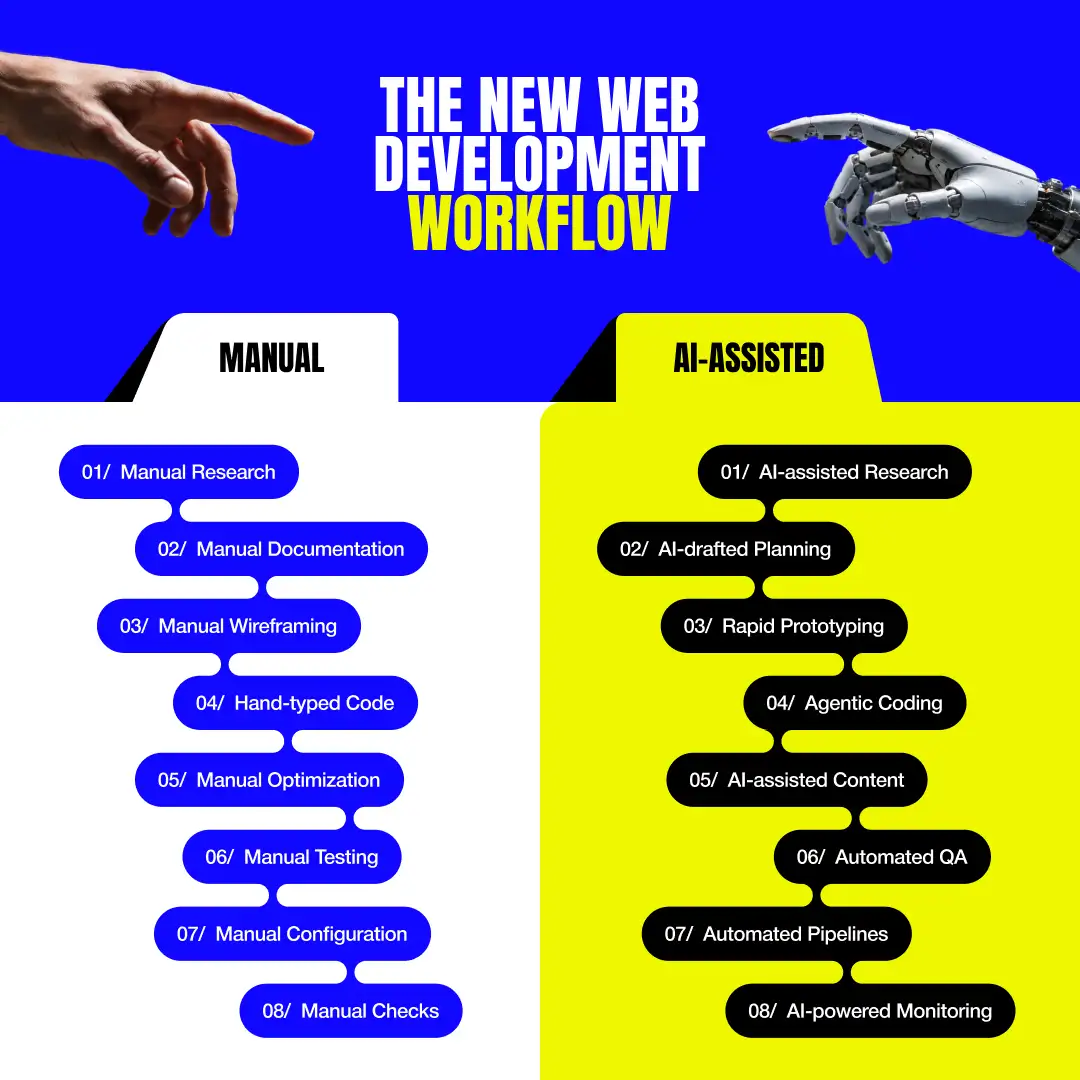
Stage 1: discovery and strategy
This is where you figure out who the site is actually for, what it needs to do, and what similar sites already get right or wrong. It’s easy to rush past this stage because it doesn’t feel like progress yet. There is no code, no design, just conversations and notes, but skipping it is one of the most common reasons a project runs over budget.
Now it’s common to run an AI tool through a first pass of competitor sites, common customer questions, and rough audience personas before a single human meeting happens, which frees up the actual meeting for decisions instead of data-gathering.
Stage 2: planning and information architecture
With the goals set, this stage turns them into something buildable. A sitemap showing every page and how they connect, a scope document, and a decision on the tech stack are discussed.
Timeline and budget usually get locked in around here too, at least roughly, which is why rushing this stage tends to cause pain later.
This used to be a few days of a project manager drawing boxes in a diagramming tool. AI can now draft a reasonable first sitemap or requirements document from a short brief in minutes.
Someone still needs to read it critically, because a generated sitemap will happily include a “Meet the Team” page for a solo freelancer’s site if you don’t catch it.
Stage 3: design and prototyping
Here, the plan turns into an actual visual design. It considers layout, color, typography, and the interface people will click through. Good design work here is less about making things look nice and more about making the right thing obvious.
Tools built for design-to-code and rapid prototyping can take a rough description or a reference image and produce a working, clickable draft in the time it used to take to open a design file.
That’s genuinely useful for getting stakeholder buy-in fast. What they’re still not great at is the harder judgment call. Does this actually feel like the brand? Is this visual hierarchy actually guiding attention where it should? That part is still a design skill, not a prompt.
Stage 4: development
At this stage, Front-end and back-end get built. This is the stage most associated with vibe coding and agentic tools, and for good reason: an agent can scaffold a component, wire up a form, or draft an API endpoint in a fraction of the time it took a few years ago.
The review loop matters more here than anywhere else in the process. A team that ships agent-generated code without a human actually reading it is the team that ends up in the security section further down this guide.
Stage 5: content, SEO, and AI-search setup
Now there is the time when content copy gets written, pages get structured, and increasingly, the site gets set up to be legible to AI crawlers as well as search engines. AI can draft a strong first pass of copy, but human editing still matters for accuracy, brand voice, and the kind of specific claims (pricing, guarantees, technical specs) that an AI will happily get slightly wrong if nobody checks. We’ll cover the AI-search side of this properly in its own section below.
Stage 6: testing and QA
Before launch, everything gets checked. Here, developers work on questions like:
- Does it work as intended
- Does it hold up under real traffic
- Does it work for people using assistive technology
- Does it behave the same way across every major browser
Sadly, this is the stage most likely to get compressed when a deadline is looming, and compressing it is almost always a mistake that shows up publicly within the first few weeks.
Stage 7: deployment and launch
The deployment stage is where your site is ready to go onto a live server with a working domain, SSL certificate, and a deployment pipeline. Modern hosting platforms have made this close to a one-click process for a lot of projects, and AI-assisted deployment configuration can catch common misconfigurations before they become a 3 am phone call.
Stage 8: maintenance and iteration
The stage every project plan mentions in one line and nearly every budget underfunds. A launched site needs ongoing security patches, content that gets refreshed instead of going stale, and performance monitoring that catches problems before users start complaining about them.
AI-powered monitoring tools can flag anomalies (a sudden traffic drop, a broken link, an unusual spike in errors) faster than a human checking a dashboard once a week ever will. Deciding what to actually do about it is still a judgment call.

Skip the Roadblocks in Your Development Roadmap
Don't let your project stall in the planning phase. Let our team take the wheel and turn your blueprint into a high-performing reality.
Building For Humans And AI: Search, Discoverability, And Answer Engines
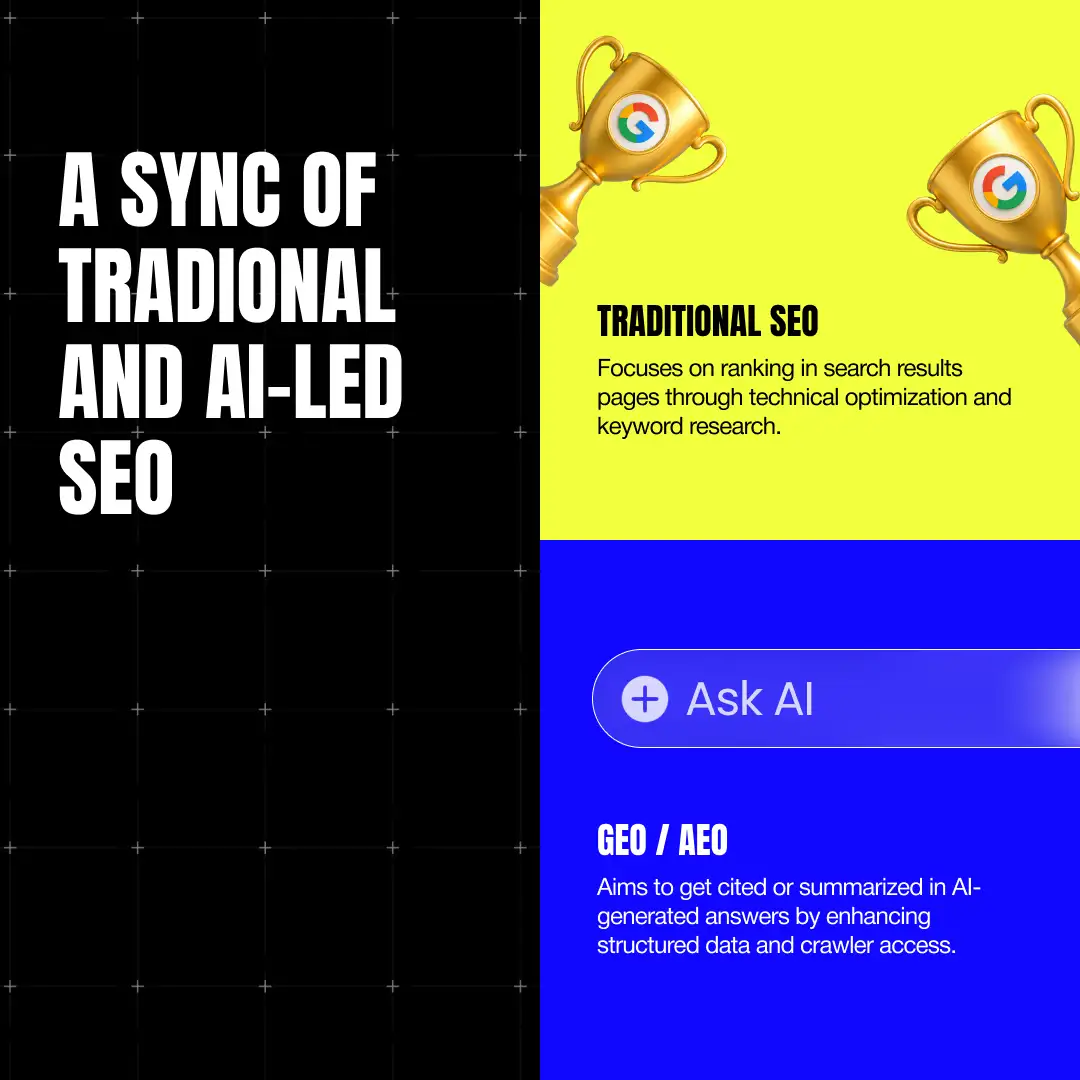
Traditional SEO fundamentals like Core Web Vitals still matter for how search engines rank you, technical SEO (clean URLs, proper redirects, no broken links) still matters, and mobile-first indexing still means your site had better work as well on a phone as it does on a laptop, because that’s the version search engines actually evaluate first.
|
What’s genuinely new is the audience. AI systems that read your site to answer someone else’s question, without that person ever visiting. The practice of optimizing for that audience is now called Generative Engine Optimization (GEO) and Answer Engine Optimization (AEO). Both show up in the wild, and they’re describing roughly the same shift.
A few concrete things actually matter here:
- Structured data and schema markup (Article, FAQPage, Organization schema) help search engines and AI systems understand what a page is actually claiming. This has been good SEO practice for years, and it’s become more important, not less, in an AI-read web.
- The llms.txt file is a newer, community-proposed convention: a plain-text file at your site’s root, similar in spirit to robots.txt, that gives engines and AI systems a curated index of your most important content. It’s not an official web standard yet, and it’s not required by any major AI platform.
- Making sure AI bots can actually read your site matters more than most teams realize. If your content only renders after JavaScript runs, and a fair number of AI crawlers still don’t execute JavaScript well, that content may as well not exist to them.
The AI-Native Web Development Toolkit
Vibe coding is the term for building software mostly by describing what you want in plain language and accepting, tweaking, or rejecting what the AI generates, rather than writing most of it by hand. It’s fast. It’s also easy to end up with something that runs but that nobody, including the person who “wrote” it, fully understands.
|
Agentic coding is a step further: instead of a single prompt-and-accept loop, an AI agent plans a series of steps, works through a codebase somewhat autonomously, and reports back, sometimes handling an entire feature end to end before a human reviews it.
Tools like Claude Code and Cursor’s agent mode work this way. It’s better suited to real production work than pure vibe coding, but it raises the stakes on review, because you’re now approving a batch of decisions instead of one line at a time.
A few tools worth knowing by name, since you’ll run into all of them sooner or later:
| Tool | Category | Best for |
| GitHub Copilot | AI coding assistant | In-editor suggestions, broad IDE support |
| Cursor | AI coding assistant/agent | Editing existing codebases with agent mode |
| Claude Code | Agentic coding tool | Terminal-based, multi-file changes across a whole repo |
| Lovable | No-code AI app builder | Non-developers building a working prototype fast |
| Bolt | No-code AI app builder | Quick, deployable demos from a prompt |
| v0 | AI design-to-code tool | Generating UI components from a description or image |
| Replit | AI app builder / IDE | Building and hosting a project in one place |
GitHub’s 2025 Octoverse report found that roughly 80% of new developers on the platform used Copilot within their first week of signing up, which tells you AI assistance is now the default starting point, not an advanced add-on.
Stack Overflow’s 2025 Developer Survey, which pulled responses from more than 49,000 developers, found something similar on the adoption side: 84% said they use or plan to use AI tools in their workflow.
But adoption and trust turned out to be two very different lines on the chart. That same survey found only 33% of developers actually trust the accuracy of what these tools produce, 46% actively distrust it, and just 3% report “highly trusting” the output.
None of that means the tools aren’t worth using. It means the sensible way to use them looks less like “let the AI build it” and more like “let the AI draft it, then treat that draft as per you.”
Website Security And Accessibility: The Non-Negotiables
These two topics rarely get the same attention as design or performance, right up until a breach or a lawsuit makes them the only thing anyone’s talking about. Neither is optional, and neither is as complicated to get right as it sounds once it’s broken into its actual parts.
Core security practices
The basics of security are still the foundation everything else sits on. It’s still where most security failures actually start, usually because one of these four got skipped under deadline pressure:
- HTTPS everywhere, not just on the checkout page
- Proper authentication on anything that involves a login or user data
- Input validation on every form or field a user can submit
- Regular dependency scanning to catch known vulnerabilities in the libraries your site relies on
The new risk: AI-generated code that looks right but isn’t
Broken Access Control is the fastest-growing category of security alert on GitHub, up 172% year over year and flagged in more than 151,000 repositories. GitHub’s own engineers pointed to misconfigured permissions in CI/CD pipelines and AI-generated scaffolds that skip critical authentication checks.
In plain terms, AI-generated code has a habit of producing an endpoint that looks correct, compiles, and passes a casual glance, while quietly missing the check that confirms the person calling it is actually allowed to.
Accessibility: meeting WCAG 2.2
WCAG 2.2, published in 2023, is the current benchmark referenced by regulators including the EU’s European Accessibility Act. It’s built around four principles:
- Content has to be perceivable
- Content has to be operable
- Content has to be understandable
- Content has to be robust
The state of the web overall gives a sense of how much room there is to stand out here just by doing it properly. WebAIM’s most recent Million report found an average of 56.1 detectable accessibility errors per home page in its February 2026 analysis, up 10.1% from the year before.
Most of the web is failing at this. Doing better doesn’t have to be expensive, and it’s one of the more overlooked ways a new site can outperform its competitors from day one.
Data privacy basics
This rounds out the list: GDPR and CCPA compliance, cookie consent handling that actually works, and a privacy policy that reflects what your site actually does rather than a template nobody reads before publishing it. It’s not glamorous work, and skipping it tends to get expensive later, usually at the worst possible time.
How Much Does Website Development Cost In 2026?
Cost is the question everyone wants a straight answer to, and the honest one is: it depends enormously on what you’re actually building, which is exactly why the range you’ll see quoted online is so wide.
| Project type | Typical 2026 range | Typical timeline |
| Landing page or single-purpose site | $1,500 – $10,000 | 1–4 weeks |
| Small business website (5–10 pages) | $3,000 – $15,000 | 2–6 weeks |
| E-commerce store | $8,000 – $60,000+ | 4–12 weeks |
| Custom web application or SaaS MVP | $20,000 – $150,000+ | 8–20+ weeks |
| Enterprise platform | $50,000 – $500,000+ | Several months to over a year |
What actually drives a quote up or down usually has less to do with page count and more to do with
- Design complexity
- Number of integrations (payment processors, CRMs, internal tools)
- Compliance (GDPR or CCPA)
- Hosting (ongoing, not one-time)
- Maintenance and updates
- Actual content creation
Choosing How To Build Your Website: DIY, No-Code/AI Builder, Freelancer, Or Agency
Nobody hands you this decision framework upfront, and it’s arguably more important than most of the technical choices further down this guide.
| Approach | Cost | Speed | Control/customization | Best fit |
| DIY / coding it yourself | Lowest (in dollars) | Slowest | Highest | Simple projects, learning, long-term ownership |
| No-code / AI builder | Low to moderate | Fastest | Moderate | MVPs, landing pages, internal tools |
| Freelancer | Moderate | Moderate | High | Small to mid-size projects with a clear brief |
| Agency | Highest | Moderate to fast | High, with more process | Complex builds, ongoing partnerships |
The DIY Approach
Building it yourself makes sense if you’re the one who’ll maintain it long-term, the project is genuinely simple, or you’re building it partly to learn. It’s the cheapest option in dollars and the most expensive in time.
Website Development With AI
No-code and AI-led Website Development have gotten remarkably good at producing a working first version fast. They’re genuinely good for a landing page, an MVP you want to test before investing more, or an internal tool that doesn’t need to survive years of feature requests.
Where they still tend to struggle is anything with complex business logic, non-standard integrations, or the kind of edge-case handling that only shows up once real users start doing unexpected things with your product.
Hiring Freelancers
Hiring a freelancer gets you one-on-one attention and usually a lower cost than an agency, at the cost of bus-factor risk (one person, one set of availability) and variable quality depending on who you find.
Hiring a Web Development Agency
Working with an agency costs more but gets you a team with a process, redundancy if someone’s out sick, and usually a broader range of skills under one contract. The trade-off is less flexibility and, sometimes, more communication overhead.
If you do go the agency route, it helps to know the common ways that relationships get structured. Fixed-price engagements work well for a clearly scoped project with a known endpoint.
A dedicated team model, where you’re essentially renting a team that works only on your product, suits ongoing development better than a one-off build. Staff augmentation, adding one or two specialists into your existing in-house team, works when you mostly have the skills covered and just need to fill a specific gap.
Bypass the Development Blindspots With Appinventiv Digital
Building a website that balances modern user expectations, complex back-end logic, and AI-native discoverability isn’t a task for a standard template. This is where Appinventiv Digital steps in. As an award-winning AI-first digital marketing agency, we help brands find their unique voice and translate it into high-performing, scalable web platforms.
We don’t just write code; we build digital experiences that drive measurable business growth. With a team of over 1,500 tech experts, we have successfully delivered 3,000+ digital products for startups, enterprises, and Fortune 500 companies alike.
Our Impact in Numbers:
- 3,000+ digital solutions delivered globally
- $950M+ raised by our startup clients
- 1,500+ in-house tech professionals
Who We’ve Worked With: Our portfolio spans multiple industries, partnering with global leaders like IKEA, KFC, Adidas, KPMG, and JobGet to engineer robust web solutions that handle massive traffic and complex transactions.
Whether you are modernizing a legacy enterprise system or launching a SaaS MVP, we combine time-tested engineering practices with modern AI workflows to create a website that stands out and delivers ROI.
Common Website Development Mistakes To Avoid
A few of these show up on almost every project that runs over budget or launches rockier than it needed to:
- Skipping discovery because everyone’s eager to start building, then discovering the actual requirements halfway through development
- Treating mobile as an afterthought instead of the primary experience most visitors will actually have
- Underinvesting in content strategy and hoping a good design will carry weak or thin copy
- Shipping without any real accessibility testing, then finding out the hard way when a user, or a regulator, does it for you
- Accepting AI-generated code without review because it ran without errors, which is a much lower bar than actually correct
- Launching without a maintenance plan, as if a website is a one-time purchase instead of something that needs upkeep like anything else you own
- Ignoring page speed until it shows up as a ranking problem or, worse, a visitor bouncing before the page even finishes loading
- Choosing a tech stack because it looks good on a resume rather than because it fits the actual project

Is your current digital presence leaving revenue on the table?
Don't wait for your competitors to outpace you with faster, AI-optimized platforms. Discover architecture gaps and uncover new growth opportunities.
Conclusion
The definition of a website has expanded. It is no longer just a digital brochure or a static URL on a business card; it is a living, breathing product. As AI agents begin to outpace human browsing, the way we build for the internet is fundamentally shifting.
Yet, amidst all the new frameworks, generative coding assistants, and shifting search behaviors, your website is the only piece of digital real estate you truly own and control. It operates on your terms, carries your brand’s voice, and serves as the ultimate anchor for your business’s credibility.
The tools we use to develop websites in 2026 are faster and more intelligent than ever before. But tools don’t build trust, strategy, performance, and user experience.